🧠 What is Azure App Service?


Azure App Service is a fully managed PaaS to host:
- Web apps (REST APIs, websites)
- Backend services
- Containers
👉 You don’t manage servers, OS patches, or runtime installs.
🧱 High-Level Architecture
User / Client
   |
   | HTTPS
   |
Azure Front Door (optional)
   |
Azure App Service
   |
App Service Plan (compute)
   |
Application Code
   |
Logs / Metrics / Monitoring
PART 1️⃣ Core Concepts (Very Important)
1️⃣ App Service vs App Service Plan
| Component | Meaning |
|---|---|
| App Service | Your application |
| App Service Plan | Compute (CPU, RAM, scaling) |
👉 Multiple apps can share one plan.
2️⃣ Supported Runtimes
- Node.js
- Python
- Java
- .NET
- PHP
- Go (via container)
- Docker containers
PART 2️⃣ Create Azure App Service (Portal)
STEP 1️⃣ Create Resource Group
| Field | Value |
|---|---|
| Name | rg-app-demo |
| Region | Central India / East US |
STEP 2️⃣ Create App Service
Basics Tab
| Setting | Value |
|---|---|
| Resource Group | rg-app-demo |
| Name | demo-api-123 |
| Publish | Code |
| Runtime | Node.js 18 / Python 3.11 |
| OS | Linux |
| Region | Same as RG |
STEP 3️⃣ Create App Service Plan
| Setting | Value |
|---|---|
| Name | asp-demo-linux |
| SKU | B1 (Dev/Test) |
| OS | Linux |
👉 You pay for App Service Plan, not app count.
STEP 4️⃣ Create
⏳ Takes ~1 minute
PART 3️⃣ Deploy an Application
OPTION A️⃣ Deploy via GitHub (Recommended)
1️⃣ Connect GitHub Repo
✔ Select repo
✔ Select branch (main)
✔ Azure auto-creates GitHub Actions
2️⃣ Example Node.js App
// index.js
const express = require("express");
const app = express();

app.get("/", (req, res) => {
  res.json({ status: "App Service working 🚀" });
});

app.listen(process.env.PORT || 3000);
3️⃣ Deployment Flow
OPTION B️⃣ Deploy via ZIP (CLI)
zip -r app.zip .
az webapp deploy \
  --resource-group rg-app-demo \
  --name demo-api-123 \
  --src-path app.zip
PART 4️⃣ Configure App Settings (Environment Variables)
| Key | Value |
|---|---|
| NODE_ENV | production |
| DB_HOST | private-db |
Access in code:
👉 No redeploy needed.
PART 5️⃣ Logs, Monitoring & Debugging
1️⃣ Enable Log Streaming
✔ Application logging: ON ✔ Log level: Information
View Logs (CLI)
2️⃣ Application Insights
Tracks:
- Requests
- Errors
- Latency
- Dependencies
PART 6️⃣ Scaling (Vertical & Horizontal)
Vertical Scaling (Change SKU)
| SKU | Use |
|---|---|
| B1 | Dev |
| S1 | Production |
| P1v3 | High traffic |
Horizontal Scaling (Auto-scale)
Example rule:
- CPU > 70% → add instance
- CPU < 30% → remove instance
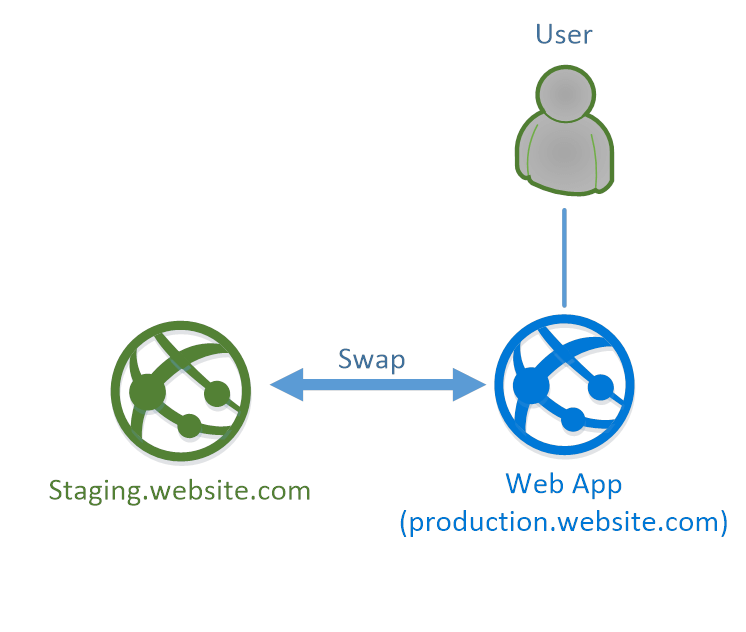
PART 7️⃣ Deployment Slots (Zero Downtime)
STEP 1️⃣ Create Slot
| Slot | Purpose |
|---|---|
| staging | Test |
| production | Live |
STEP 2️⃣ Deploy to Staging
- GitHub Action deploys to
staging
STEP 3️⃣ Swap
✔ Zero downtime ✔ Instant rollback
PART 8️⃣ Networking & Security (Production-Grade)
1️⃣ Restrict Public Access
Allow:
- Office IP
- VPN
- Azure services only
2️⃣ VNet Integration (Outbound)
Use when:
- Access private DB
- Call private APIs
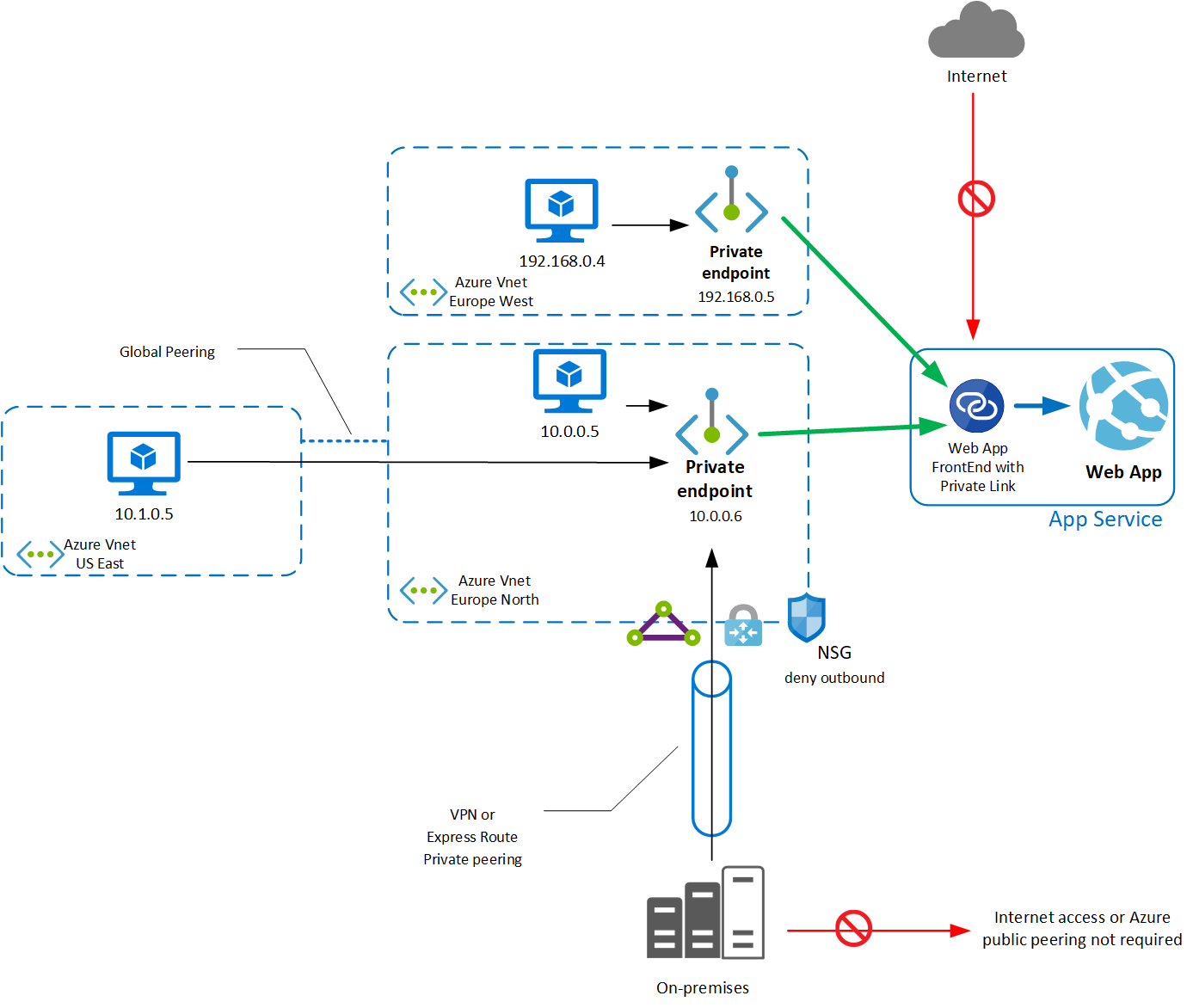
3️⃣ Private Endpoint (Inbound)
✔ App accessible only via VPN / VNet ✔ No public internet exposure
PART 9️⃣ Custom Domain & HTTPS
Steps:
- Add DNS record (CNAME / A)
- Bind domain
- Enable HTTPS (free SSL)
PART 🔟 Backup & Restore
- Schedule daily backups
- Store in Blob Storage
- Restore with 1 click
PART 1️⃣1️⃣ Validate Everything
Check App
✔ Response OK
Check Logs
Check Scaling
🧠 Common Mistakes (Avoid These)
| Mistake | Fix |
|---|---|
| Using Free tier for prod | Use S1+ |
| Hardcoding secrets | Use App Settings / Key Vault |
| No health checks | Enable health probe |
| No slots | Always use staging |
| No monitoring | Enable App Insights |
🏁 Final Mental Model
App Service Plan = Engine
App Service      = Car
Deployment Slot  = Gearbox
App Settings     = Fuel
Monitoring       = Dashboard