🔵 Azure Blob Storage — Full End-to-End Tutorial


0️⃣ Prerequisites (assumed done)
- Azure Storage Account (
StorageV2) - HTTPS only + TLS 1.2 enabled
- Azure CLI logged in
- Variable available:
1️⃣ What Blob Storage Is (Mental Model)
Blob Storage = object storage for unstructured data
Used for:
- Images, videos
- Logs & backups
- Frontend assets
- Artifacts (ZIPs, builds)
Hierarchy (must remember)
- Containers are flat
- “Folders” are virtual
2️⃣ Create a Blob Container (Private)
Always start with private containers
az storage container create \
  --name blob-container \
  --account-name $STORAGE \
  --public-access off \
  --auth-mode login
✔ No anonymous access ✔ Azure AD–based authentication
3️⃣ Upload Data to Blob Storage
Upload a single file
az storage blob upload \
  --account-name $STORAGE \
  --container-name blob-container \
  --name hello.txt \
  --file ./hello.txt \
  --auth-mode login
Upload a folder (very common)
az storage blob upload-batch \
  --account-name $STORAGE \
  --destination blob-container \
  --source ./assets \
  --auth-mode login
4️⃣ List, Download, Delete Blobs
List blobs
az storage blob list \
  --account-name $STORAGE \
  --container-name blob-container \
  -o table \
  --auth-mode login
Download blob
az storage blob download \
  --account-name $STORAGE \
  --container-name blob-container \
  --name hello.txt \
  --file ./hello-downloaded.txt \
  --auth-mode login
Delete blob
az storage blob delete \
  --account-name $STORAGE \
  --container-name blob-container \
  --name hello.txt \
  --auth-mode login
5️⃣ Authentication Models (Very Important)
| Method | When to use |
|---|---|
| Azure AD / Managed Identity | Backend, servers, App Service |
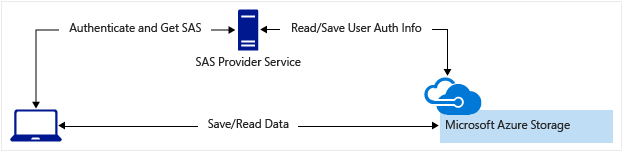
| SAS Token | Frontend, temporary access |
| Access Keys | ❌ Avoid |
6️⃣ Generate & Use SAS Token (Temporary Access)
Generate container-level SAS
EXPIRY=$(date -u -d "1 hour" '+%Y-%m-%dT%H:%MZ')

az storage container generate-sas \
  --account-name $STORAGE \
  --name blob-container \
  --permissions rwdl \
  --expiry $EXPIRY \
  --auth-mode login \
  -o tsv
Full SAS URL
Upload using SAS (no login)
az storage blob upload \
  --account-name $STORAGE \
  --container-name blob-container \
  --name test.txt \
  --file ./test.txt \
  --sas-token "<SAS_TOKEN>"
7️⃣ Blob Access Tiers (Cost Control)
| Tier | Use case |
|---|---|
| Hot | Active data |
| Cool | Rare access |
| Archive | Long-term backup |
Set tier
az storage blob set-tier \
  --account-name $STORAGE \
  --container-name blob-container \
  --name backup.zip \
  --tier Cool \
  --auth-mode login
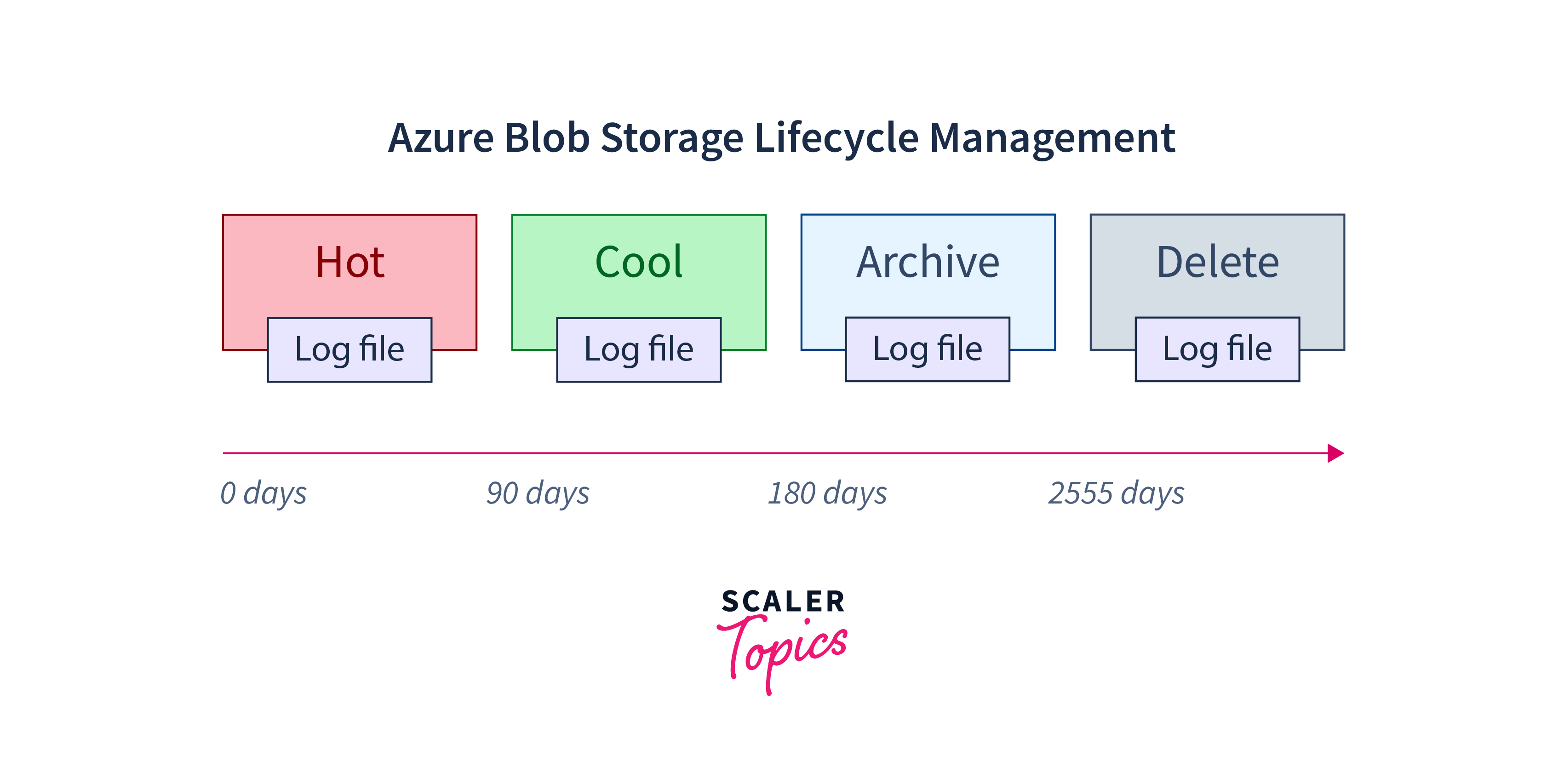
8️⃣ Lifecycle Management (Auto Cleanup)
Saves real money in production
Example:
- Hot → Cool after 30 days
- Delete after 90 days
az storage account management-policy create \
  --account-name $STORAGE \
  --resource-group $RESOURCE_GROUP \
  --policy '{
    "rules": [
      {
        "name": "cleanup-old-blobs",
        "type": "Lifecycle",
        "definition": {
          "filters": {
            "blobTypes": ["blockBlob"]
          },
          "actions": {
            "baseBlob": {
              "tierToCool": { "daysAfterModificationGreaterThan": 30 },
              "delete": { "daysAfterModificationGreaterThan": 90 }
            }
          }
        },
        "enabled": true
      }
    ]
  }'
9️⃣ Enable Soft Delete (Accidental Protection)
az storage account blob-service-properties update \
  --account-name $STORAGE \
  --resource-group $RESOURCE_GROUP \
  --enable-delete-retention true \
  --delete-retention-days 14
✔ Recover deleted blobs within 14 days
🔟 Security Best Practices (Must Follow)
✅ Private containers ✅ HTTPS only ✅ TLS 1.2 ✅ Azure AD or SAS ❌ No public blobs ❌ No access keys in apps ❌ No long-lived SAS
1️⃣1️⃣ Common Real-World Architectures
Frontend Upload Flow
Backend Access
Logs & Backups
1️⃣2️⃣ Blob Storage Cost Model (Know This)
You pay for:
- Stored data (GB)
- Read/write operations
- Data egress
- Tier (Hot/Cool/Archive)
💡 Reads are cheap, writes & deletes cost more
🧠 Blob Storage in One Line
Azure Blob Storage is secure, scalable object storage accessed via Azure AD or SAS, optimized using tiers and lifecycle rules.
✅ You Now Fully Know Blob Storage
✔ Containers ✔ Upload / download ✔ SAS usage ✔ Security ✔ Cost control ✔ Lifecycle ✔ Real-world patterns