1️⃣ What is Azure Traffic Manager?
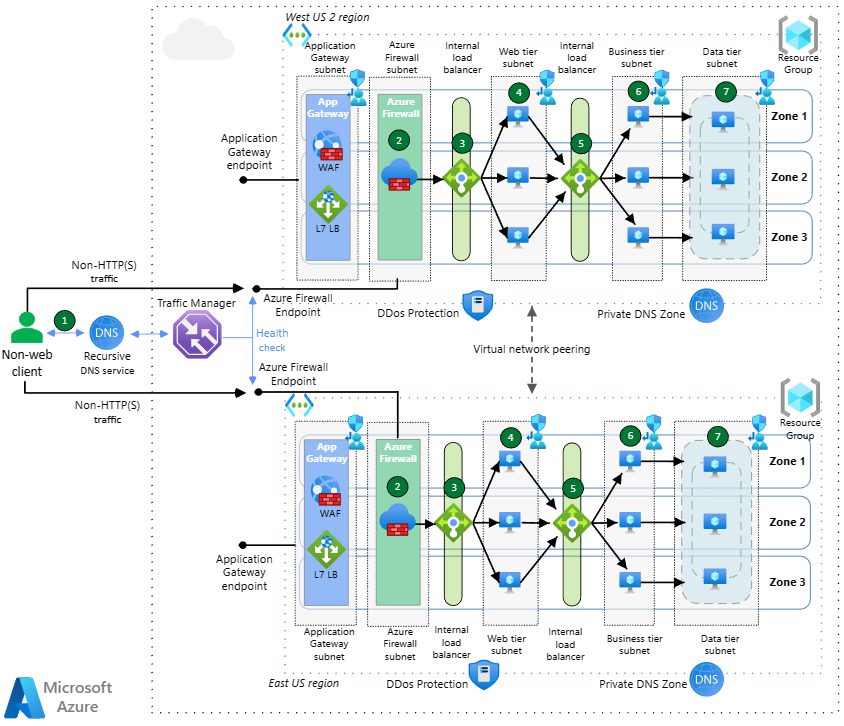
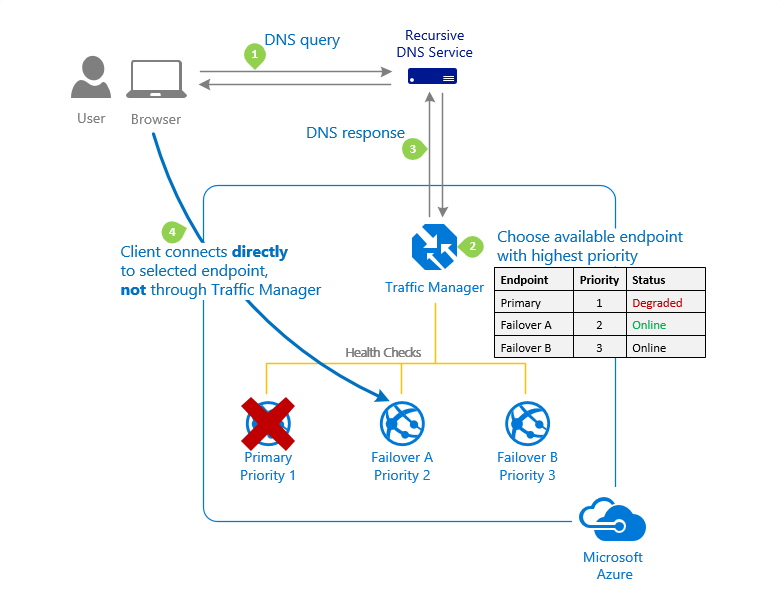
Azure Traffic Manager is a DNS-based global traffic routing service from Microsoft Azure.
👉 It does not sit in the data path 👉 It answers DNS queries based on routing rules
This makes it:
- Extremely fast
- Highly available
- Perfect for multi-region failover
2️⃣ When to Use Traffic Manager
Use Traffic Manager when you need:
✅ Regional failover ✅ Multi-region active-passive ✅ Disaster recovery (DR) ✅ Global users
🚫 Not for:
- Path-based routing
- SSL termination
- WAF
(That’s App Gateway / Front Door)
3️⃣ Routing Methods (Quick Overview)
| Routing Method | Use Case |
|---|---|
| Priority | Active-Passive failover |
| Weighted | Traffic split (canary) |
| Performance | Nearest region |
| Geographic | Country-based |
| MultiValue | Multiple healthy endpoints |
👉 We focus on Priority routing here.
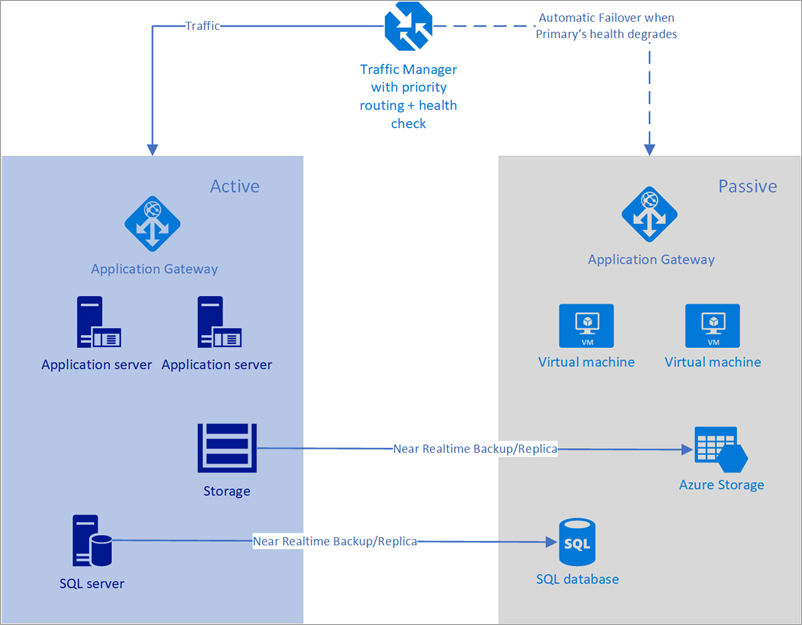
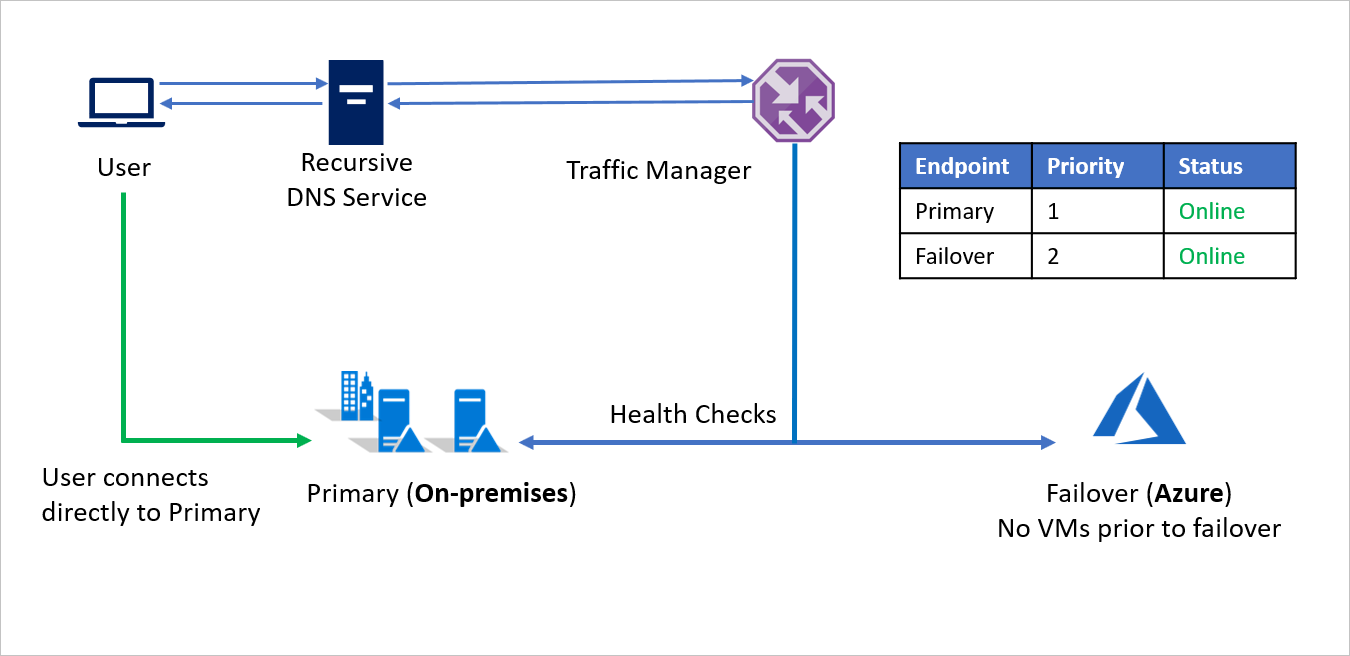
4️⃣ Architecture: Priority Routing (Active-Passive)
User
 ↓  DNS Query
Azure Traffic Manager
 ↓
Primary Endpoint (Region A)
 ↓ (if unhealthy)
Secondary Endpoint (Region B)
5️⃣ Prerequisites (Lab Setup)
You need two regional endpoints, for example:
-
Region 1 (Primary):
-
Azure Application Gateway / Load Balancer
-
Public IP or DNS
-
Region 2 (Secondary):
-
Same setup
- Different region
Example:
6️⃣ Step-by-Step: Create Traffic Manager Profile
🔧 Step 1: Create Traffic Manager
Azure Portal → Traffic Manager profiles → Create
Basics
| Setting | Value |
|---|---|
| Routing method | Priority |
| Subscription | Your subscription |
| Resource group | Existing / New |
| Name | tm-priority-demo |
🔧 Step 2: Configure DNS Settings
Traffic Manager gives you:
👉 This becomes the global entry point
7️⃣ Add Endpoints (Critical Step)
🔧 Step 3: Add Primary Endpoint
Traffic Manager → Endpoints → Add
| Setting | Value |
|---|---|
| Type | Azure endpoint / External |
| Name | primary-eastus |
| Target | App Gateway / LB |
| Priority | 1 |
| Endpoint status | Enabled |
🔧 Step 4: Add Secondary Endpoint
| Setting | Value |
|---|---|
| Name | secondary-westus |
| Target | App Gateway / LB |
| Priority | 2 |
| Endpoint status | Enabled |
📌 Lower number = higher priority
8️⃣ Configure Health Checks (Monitoring)
🔍 Step 5: Monitoring Settings
Traffic Manager → Configuration
| Setting | Recommended |
|---|---|
| Protocol | HTTP |
| Port | 80 or 443 |
| Path | /health |
| Probe interval | 30 seconds |
| Tolerated failures | 3 |
👉 Traffic Manager uses this to decide failover
9️⃣ Create Health Endpoint on Backends
On each region, ensure:
Returns:
Example (Nginx):
🔟 Test Priority Routing (Normal State)
🧪 Test 1: DNS Resolution
Result:
- Resolves to Primary region IP
🧪 Test 2: Application Access
Response:
✅ Traffic always goes to Priority 1
1️⃣1️⃣ Test Regional Failover (IMPORTANT)
Now simulate a real outage 🔥
🧪 Test 3: Break Primary Region
Options:
- Stop backend service
- Block port 80/443
- Stop VM / App Gateway
Example:
🧪 Test 4: Observe Failover
Wait:
- ~90 seconds (probe interval × tolerated failures)
Then:
Now resolves to:
Access app:
Response:
✅ Regional failover successful
1️⃣2️⃣ Restore Primary (Failback)
Restart primary service:
After probes succeed:
- Traffic automatically returns to Priority 1
🔁 This is automatic failback
1️⃣3️⃣ Key Characteristics (Interview Gold)
- DNS-based → TTL matters
- No packet inspection
- Health probes decide routing
- Works with any public endpoint
- Global, highly available
1️⃣4️⃣ Common Mistakes
❌ No /health endpoint
❌ Long DNS TTL (slow failover)
❌ Assuming instant failover
❌ Expecting L7 features
❌ Using Traffic Manager for private endpoints
1️⃣5️⃣ Traffic Manager vs Front Door (Quick)
| Feature | Traffic Manager | Front Door |
|---|---|---|
| Routing level | DNS | HTTP |
| WAF | ❌ | ✅ |
| SSL termination | ❌ | ✅ |
| Failover | ✅ | ✅ |
| Cost | Low | Higher |
1️⃣6️⃣ Interview-Ready Explanation (30 Seconds)
Azure Traffic Manager is a DNS-based global traffic routing service. With priority routing, it enables active-passive regional failover by directing traffic to the highest-priority healthy endpoint based on health probes.