🧠 What is Point-to-Site (P2S) VPN?
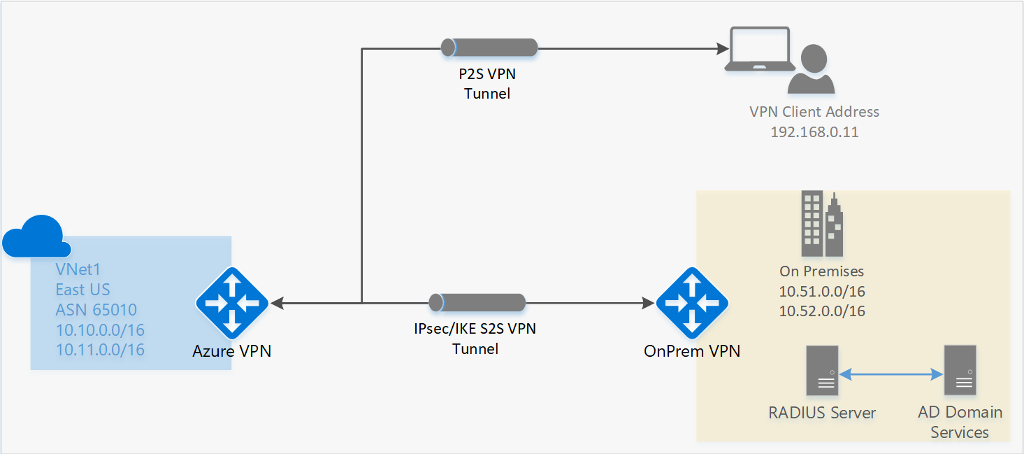

Point-to-Site VPN allows:
- A single client machine (laptop)
- To connect securely to Azure VNet
- Over an encrypted tunnel
Real-world uses
- Developers accessing private DBs
- Admins managing VMs securely
- Work-from-home access
- Zero-Trust style access
🧱 Final Architecture (Mental Model)
Developer Laptop
   |
   |  OpenVPN / SSL Tunnel
   |
Azure VPN Gateway
   |
GatewaySubnet
   |
Azure VNet
   |
Private Subnets → VM / App / DB
No on-prem firewall required. No public exposure.
STEP 0️⃣ Prerequisites (Must Have)
| Requirement | Notes |
|---|---|
| Azure VPN Gateway | Route-based only |
| SKU | VpnGw1 or higher |
| VNet address space | Must NOT overlap P2S pool |
| Client OS | Windows / Linux / macOS |
STEP 1️⃣ Choose P2S Authentication Method
Azure supports 3 methods:
| Method | Use Case | Recommendation |
|---|---|---|
| Certificate | Labs / learning | ✅ Start here |
| Azure AD | Enterprise | ⭐ Best |
| RADIUS | Legacy | ❌ Rare |
👉 This tutorial uses Certificate-based auth (best for learning).
STEP 2️⃣ Define P2S Address Pool
This is the IP range given to VPN clients.
⚠️ Must NOT overlap:
- VNet CIDR
- On-prem CIDR
Example
STEP 3️⃣ Configure P2S on VPN Gateway (Portal)
Settings
| Field | Value |
|---|---|
| Address pool | 172.16.201.0/24 |
| Tunnel type | OpenVPN (SSL) |
| Authentication | Azure certificate |
| Root certificate | Upload |
📌 Do NOT save yet — we need certificates first.
STEP 4️⃣ Create Root Certificate (On Your Laptop)
This cert proves “I trust clients signed by me”
Create root key
Create root certificate
✔ root.key → keep secret
✔ root.crt → upload to Azure
STEP 5️⃣ Upload Root Certificate to Azure
| Field | Value |
|---|---|
| Name | root-cert |
| Public cert data | content of root.crt |
Copy entire output (including BEGIN/END).
STEP 6️⃣ Generate Client Certificate
Each laptop must have its own client cert.
Client key
Client CSR
Sign with root certificate
openssl x509 -req \
  -in client.csr \
  -CA root.crt \
  -CAkey root.key \
  -CAcreateserial \
  -out client.crt \
  -days 365 \
  -sha256
STEP 7️⃣ Install Client Certificate on Laptop
🔹 Windows
- Double-click
client.crt - Install → Current User
- Store → Personal
🔹 Linux
🔹 macOS
- Import into Keychain Access
- Mark as trusted
STEP 8️⃣ Save P2S Configuration
Now go back to Azure Portal and Save P2S config.
⏳ Takes ~5 minutes
STEP 9️⃣ Download VPN Client
This gives:
- Windows installer
- OpenVPN config for Linux/macOS
STEP 🔟 Connect to VPN
🔹 Windows
- Open Azure VPN Client
- Click Connect
🔹 Linux
🔹 macOS
- Import
.ovpninto Tunnelblick / Viscosity
STEP 1️⃣1️⃣ Validate VPN Connection (CRITICAL)
✔ Check client IP
Expected:
✔ Test private VM access
✔ Works = VPN successful ❌ Fails = routing / NSG issue
✔ Check Azure Effective Routes
You should see:
🔐 Security Best Practices
| Rule | Why |
|---|---|
| Use OpenVPN only | Secure & flexible |
| Rotate client certs | Prevent abuse |
| Disable unused certs | Least privilege |
| Use Azure AD auth | Enterprise-grade |
| Combine with Private Endpoint | Zero Trust |
🧠 Common Problems & Fixes
| Issue | Cause | Fix |
|---|---|---|
| VPN connects but no access | NSG blocks | Allow VNet CIDR |
| DNS not resolving | No private DNS | Configure DNS |
| Overlapping CIDR | Bad IP plan | Redesign ranges |
| Client cert rejected | Wrong root cert | Re-upload |
🏁 Final Mental Model
Root Certificate   → Trust authority
Client Certificate → User identity
P2S Pool           → Client IPs
VPN Gateway        → Entry point
VNet               → Private resources