1️⃣ What is Azure Application Gateway (L7)?
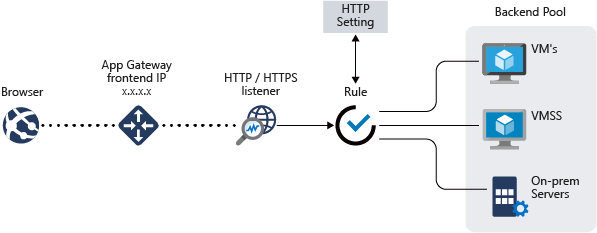
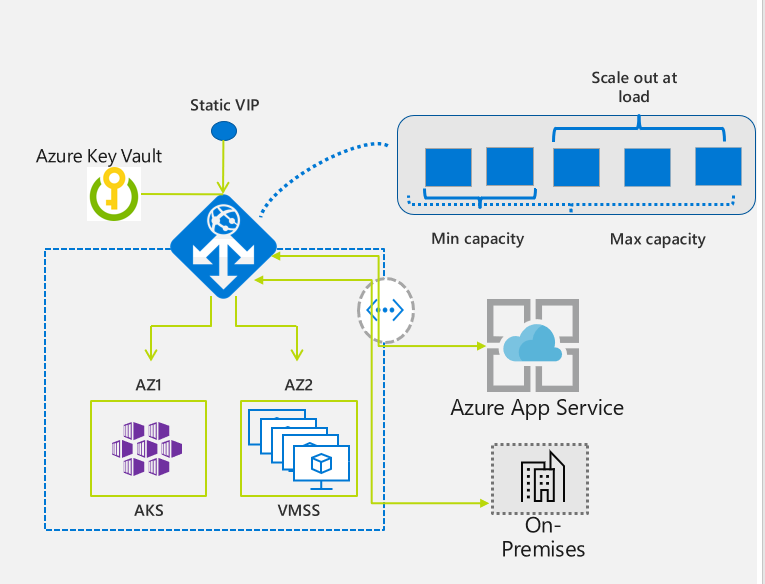
Azure Application Gateway is a Layer-7 HTTP/HTTPS load balancer from Microsoft Azure.
It understands:
- URLs
- Host headers
- Cookies
- HTTP methods
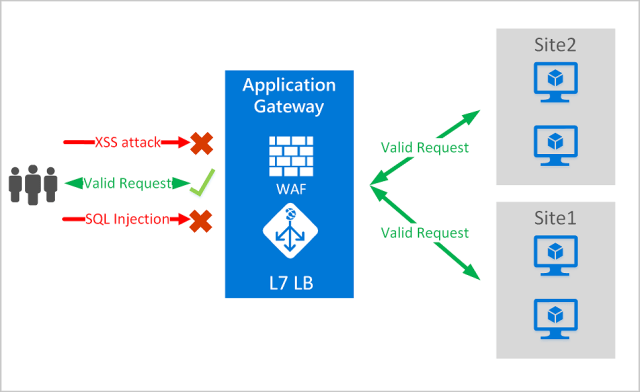
And can inspect traffic using WAF.
2️⃣ When to Use Application Gateway (vs Load Balancer)
Use Application Gateway when you need:
✅ URL-based routing ✅ SSL termination ✅ Web Application Firewall (WAF) ✅ Cookie-based session affinity ✅ HTTP header inspection
👉 If traffic is HTTP/HTTPS → App Gateway 👉 If traffic is TCP/UDP → Load Balancer
3️⃣ Architecture Overview (Mental Model)
Internet
   ↓
Public IP
   ↓
Application Gateway (L7)
   ├─ WAF (OWASP rules)
   ├─ Listeners (80/443)
   ├─ Routing rules
   ↓
Backend Pool
   ↓
VMs / VM Scale Set / App Service
4️⃣ Step-by-Step: Create Application Gateway (Portal)
🔧 Step 1: Prerequisites
You need:
- Resource Group
-
VNet with dedicated subnet (mandatory)
-
Example:
10.0.2.0/24
🚨 Application Gateway must have its own subnet
🔧 Step 2: Create Application Gateway
Azure Portal → Application Gateways → Create
Basics
| Setting | Value |
|---|---|
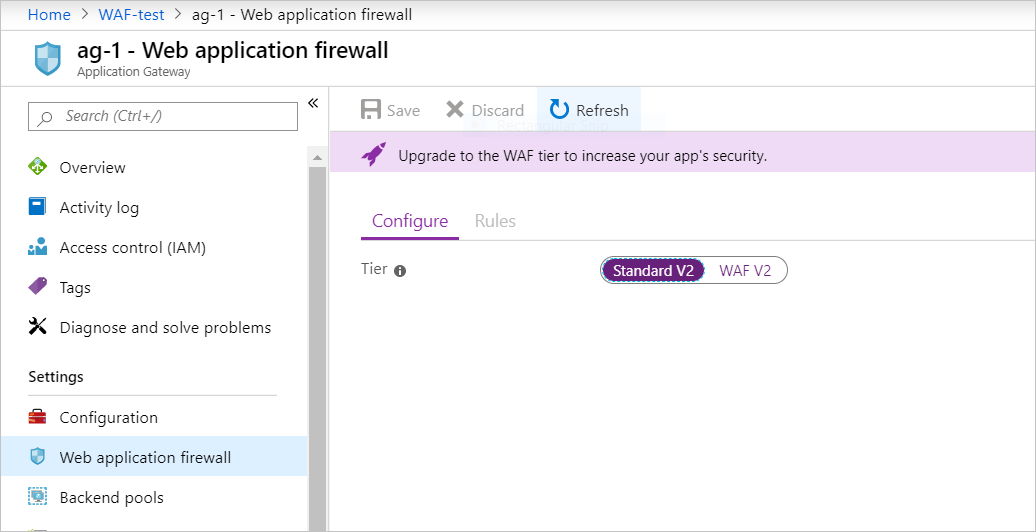
| SKU | WAF v2 |
| Tier | WAF v2 |
| Autoscaling | Enabled |
| Min / Max | 1 / 2 |
🔧 Step 3: Networking
- VNet: existing
- Subnet:
appgw-subnet - Public IP: new (Standard, static)
🔧 Step 4: Backend Pool
Add backend targets:
- Virtual Machines or
- VM Scale Set or
- App Service
Example:
🔧 Step 5: HTTP Settings
| Setting | Value |
|---|---|
| Protocol | HTTP |
| Port | 80 |
| Cookie-based affinity | Disabled |
| Connection draining | Optional |
🔧 Step 6: Listener
| Setting | Value |
|---|---|
| Protocol | HTTP |
| Port | 80 |
| Frontend IP | Public |
🔧 Step 7: Routing Rule
- Listener → Backend pool
- HTTP settings attached
- Rule type: Basic
5️⃣ Enable WAF (Web Application Firewall)
🔐 What is WAF?
WAF protects against:
- SQL Injection
- XSS
- Command injection
- Path traversal
- OWASP Top 10 attacks
🔧 Step 8: WAF Configuration
Application Gateway → Web Application Firewall
| Setting | Value |
|---|---|
| WAF Mode | Detection (start here) |
| Rule set | OWASP 3.2 |
| Request body inspection | Enabled |
| Max body size | 128 KB |
👉 Detection = log only 👉 Prevention = block traffic
6️⃣ Enable WAF Logs (Very Important)
🔧 Step 9: Diagnostic Settings
Application Gateway → Diagnostic settings
Enable:
- WAFLogs
- AccessLogs
- PerformanceLogs
Send to:
- Log Analytics Workspace
7️⃣ Test WAF Rules (Hands-On)
Now the most important part 🔥
🧪 Test 1: SQL Injection
✅ In Detection mode:
- Request passes
- Log is generated
Check logs:
🧪 Test 2: XSS Attack
Expected:
- WAF rule triggered
- Logged under OWASP rules
🧪 Test 3: Command Injection
WAF detects:
- OS command injection pattern
8️⃣ Switch WAF to Prevention Mode
Once confident 👇
Application Gateway → WAF → Configuration
Change:
Now repeat tests ⬆️
❌ Requests will be blocked (403 Forbidden)
9️⃣ Custom WAF Rule (Optional but Powerful)
Example: Block a specific IP
Used for:
- Bot blocking
- Geo blocking
- Abuse prevention
🔟 NSG & Security Notes
- Backend NSG allows traffic only from App Gateway subnet
- No public IP on backend VMs
- TLS termination at App Gateway
11️⃣ App Gateway vs Load Balancer (Quick Recap)
| Feature | App Gateway | Load Balancer |
|---|---|---|
| OSI Layer | L7 | L4 |
| URL routing | ✅ | ❌ |
| WAF | ✅ | ❌ |
| SSL offload | ✅ | ❌ |
| Performance | Medium | Very High |
12️⃣ Interview-Ready Explanation (1 Minute)
Azure Application Gateway is a Layer-7 load balancer that supports HTTP routing, SSL termination, and Web Application Firewall. WAF inspects requests using OWASP rules and can run in detection or prevention mode. It is commonly placed in front of web applications for security and intelligent traffic routing.
13️⃣ Real-World Production Pattern
Internet
   ↓
Azure Application Gateway (WAF – Prevention)
   ↓
Internal Load Balancer
   ↓
VM Scale Set / AKS
14️⃣ Common Mistakes (Interview Gold)
❌ Forgetting dedicated subnet ❌ No diagnostic logs enabled ❌ Using Prevention mode immediately ❌ Backend exposed to internet ❌ Expecting TCP support