1️⃣ What is Azure Load Balancer?
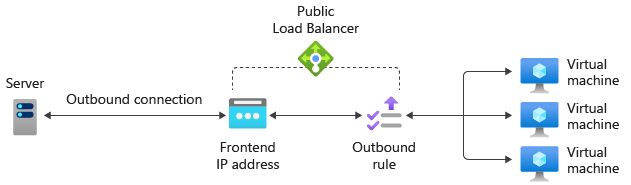
Azure Load Balancer is a Layer-4 (TCP/UDP) load balancer provided by Microsoft Azure.
It distributes network traffic across multiple backend resources such as:
- Virtual Machines
- VM Scale Sets
- Internal services

👉 It does NOT inspect HTTP headers or paths (that’s Application Gateway’s job).
2️⃣ When should you use Azure Load Balancer?
Use Azure Load Balancer when you need:
✅ High availability ✅ Low latency ✅ Massive scale ✅ Raw TCP/UDP traffic handling
Typical use cases
- Backend APIs
- Databases (read replicas)
- Game servers
- SSH/RDP load balancing
- Internal microservices
3️⃣ Types of Azure Load Balancer
🔹 Public Load Balancer
- Internet-facing
- Has a public IP
- Used for external traffic
🔹 Internal Load Balancer
- Private IP only
- Used inside a VNet
- Microservices, internal APIs
4️⃣ SKU: Basic vs Standard (IMPORTANT)
| Feature | Basic | Standard |
|---|---|---|
| SLA | ❌ No | ✅ 99.99% |
| Secure by default | ❌ | ✅ |
| Availability Zones | ❌ | ✅ |
| Backend pool limit | Low | High |
| Health probes | Basic | Advanced |
👉 Always use Standard Load Balancer in production
5️⃣ Core Components (Must Know for Interviews)
🧩 1. Frontend IP Configuration
- Public or Private IP
- Entry point for traffic
🧩 2. Backend Pool
- Set of VMs or VMSS
- Traffic is distributed here
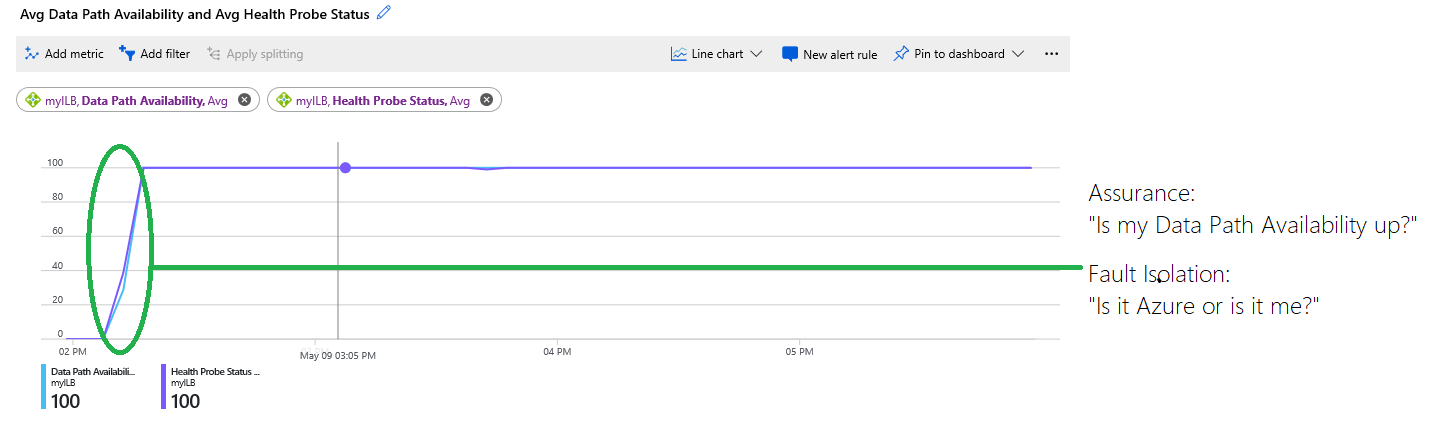
🧩 3. Health Probe
- Checks VM health
- Removes unhealthy instances automatically
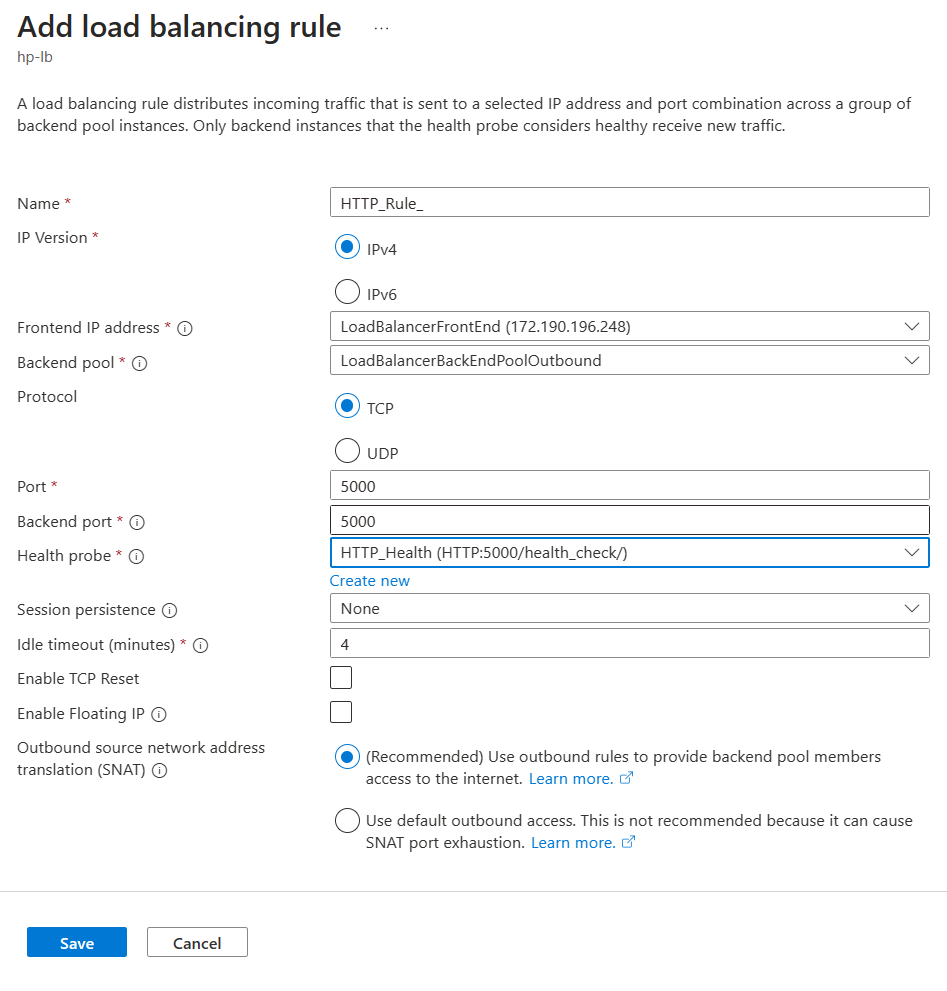
🧩 4. Load Balancing Rule
- Maps frontend → backend
- Defines protocol & ports
🧩 5. NAT Rules (Optional)
- Port forwarding (SSH/RDP)
- Used for admin access
6️⃣ Architecture Flow (Mental Model)
Client
   ↓
Frontend IP (Public / Private)
   ↓
Load Balancing Rule
   ↓
Health Probe
   ↓
Backend Pool
   ↓
VMs / VM Scale Set
7️⃣ Hands-On: End-to-End Setup (Portal Method)
🔧 Step 1: Create Resource Group
🔧 Step 2: Create Virtual Network
- Address space:
10.0.0.0/16 - Subnet:
10.0.1.0/24
🔧 Step 3: Create 2 Virtual Machines
- Same VNet & Subnet
- Same OS (Ubuntu / Windows)
- Install a simple web server
Example (Linux VM):
sudo apt update
sudo apt install nginx -y
echo "Hello from VM-1" | sudo tee /var/www/html/index.html
Repeat for VM-2 (change message).
🔧 Step 4: Create Public IP
- SKU: Standard
- Assignment: Static
🔧 Step 5: Create Azure Load Balancer
- SKU: Standard
- Type: Public
- Attach the Public IP
🔧 Step 6: Create Backend Pool
- Add both VMs
- Use NIC-based association
🔧 Step 7: Configure Health Probe
- Protocol: HTTP
- Port: 80
- Path:
/ - Interval: 5 seconds
- Unhealthy threshold: 2
🔧 Step 8: Create Load Balancing Rule
| Setting | Value |
|---|---|
| Frontend Port | 80 |
| Backend Port | 80 |
| Protocol | TCP |
| Backend Pool | Your VM pool |
| Health Probe | HTTP probe |
🔧 Step 9: NSG Configuration (CRITICAL)
Allow inbound:
- Port 80
- Source: Internet
- Destination: VMs
🔧 Step 10: Test
Open the Load Balancer public IP in browser.
🔄 Refresh multiple times → response switches between VMs.
8️⃣ Azure Load Balancer via Azure CLI (Quick)
az network lb create \
  --resource-group rg-azure-lb-demo \
  --name demo-lb \
  --sku Standard \
  --public-ip-address demo-lb-pip
(Used mostly in automation & CI/CD)
9️⃣ Load Balancer vs Application Gateway
| Feature | Load Balancer | App Gateway |
|---|---|---|
| OSI Layer | L4 | L7 |
| HTTP routing | ❌ | ✅ |
| SSL termination | ❌ | ✅ |
| Web Application Firewall | ❌ | ✅ |
| Performance | ⚡ Very fast | Slightly slower |
👉 Rule of thumb
- Infra traffic → Load Balancer
- Web apps → Application Gateway
🔐 10️⃣ Security Best Practices
- Always use Standard SKU
- Use NSGs + Azure Firewall
- No public backend VM IPs
- Enable Azure Monitor metrics
- Use Availability Zones
📊 11️⃣ Monitoring & Observability
-
Azure Monitor metrics:
-
Data processed
- Health probe status
- Log Analytics (limited)
-
Integrate with:
-
VM logs
- Application telemetry
🧠 12️⃣ Interview-Ready Explanation (1-Minute)
Azure Load Balancer is a Layer-4 service that distributes TCP/UDP traffic across backend resources. It ensures high availability using health probes and supports both public and internal load balancing. For production, Standard SKU is used with availability zones, NSGs, and monitoring enabled.
13️⃣ Real-World Production Pattern
14️⃣ Common Mistakes
❌ Using Basic SKU ❌ Forgetting NSG rules ❌ Expecting URL-based routing ❌ No health probe ❌ Public IP on backend VMs