1️⃣ What is a Health Probe in Azure Load Balancer?
A Health Probe is the mechanism Azure Load Balancer uses to decide:
✅ Which backend instances are healthy ❌ Which ones should stop receiving traffic
If a VM fails health checks, Azure automatically removes it from traffic.
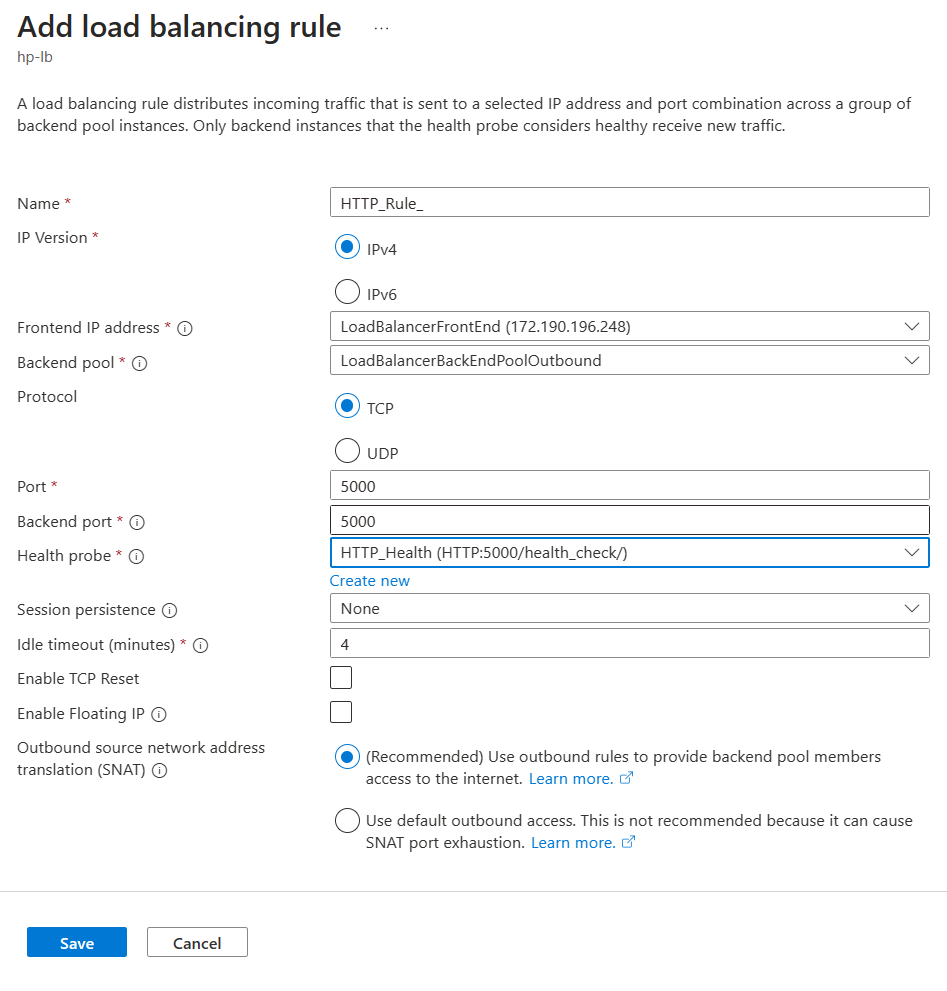


This is a core high-availability feature of Microsoft Azure Load Balancer.
2️⃣ How Health Probes Work (Mental Model)
Azure Load Balancer
        |
        |-- Probe Request (every X seconds)
        |
Backend VM
        |
        |-- Response (success / fail)
- If probe succeeds → VM stays in backend pool
- If probe fails N times → VM is marked unhealthy
- Traffic is not sent to unhealthy VMs
3️⃣ Types of Health Probes
🔹 1. TCP Health Probe
- Checks if a TCP port is open
- Does NOT understand HTTP status codes
Use when
- SSH
- Databases
- Non-HTTP services
Limitation
- App may be broken but port is still open → false healthy
🔹 2. HTTP / HTTPS Health Probe (Recommended)
- Sends HTTP request to a path
- Expects response code 200–399
Use when
- Web apps
- APIs
- Microservices
Best practice ✅
4️⃣ Health Probe Configuration Parameters (IMPORTANT)
| Parameter | Meaning |
|---|---|
| Protocol | TCP / HTTP / HTTPS |
| Port | Backend service port |
| Path | URL path (HTTP only) |
| Interval | How often probe runs |
| Unhealthy threshold | Failures before removal |
| Timeout | Probe response wait time |
5️⃣ End-to-End: Configure Health Probe (Azure Portal)
🔧 Step 1: Open Load Balancer
- Azure Portal → Load Balancers
- Select your Standard Load Balancer
🔧 Step 2: Go to Health Probes
- Left menu → Health probes
- Click ➕ Add
🔧 Step 3: Configure HTTP Health Probe (Example)
| Setting | Value |
|---|---|
| Name | http-probe-80 |
| Protocol | HTTP |
| Port | 80 |
| Path | /health |
| Interval | 5 seconds |
| Unhealthy threshold | 2 |
👉 This means:
- Azure checks
/healthevery 5s - If 2 failures, VM is removed
🔧 Step 4: Create Health Endpoint on VM (CRITICAL)
On each backend VM, your app must respond 200 OK.
Example (Nginx)
Add:
Reload:
🔧 Step 5: Attach Health Probe to Load Balancing Rule
- Go to Load balancing rules
- Edit your rule
- Select
http-probe-80 - Save
🚨 Health probes do nothing unless attached to a rule
6️⃣ NSG Rules for Health Probes (Very Important)
Azure health probes originate from Azure infrastructure, not the internet.
Ensure NSG allows:
| Field | Value |
|---|---|
| Source | AzureLoadBalancer |
| Destination | VM |
| Port | Backend port |
| Action | Allow |
Without this → all VMs become unhealthy
7️⃣ Health Probe via Azure CLI
Create HTTP Probe
az network lb probe create \
  --resource-group rg-azure-lb-demo \
  --lb-name demo-lb \
  --name http-probe-80 \
  --protocol Http \
  --port 80 \
  --path /health \
  --interval 5 \
  --threshold 2
Attach Probe to Rule
az network lb rule update \
  --resource-group rg-azure-lb-demo \
  --lb-name demo-lb \
  --name http-rule \
  --probe-name http-probe-80
8️⃣ Testing Health Probe Behavior (Hands-On)
Test 1: Normal State
✅ Both VMs serve traffic
Test 2: Break One VM
Result:
- Health probe fails
- VM removed from backend
- Traffic continues to other VM
Test 3: Restore VM
After 1–2 probe intervals:
- VM becomes healthy
- Traffic resumes
9️⃣ TCP Health Probe Example
| Setting | Value |
|---|---|
| Protocol | TCP |
| Port | 3306 |
| Interval | 10s |
| Threshold | 3 |
Used for:
- MySQL
- PostgreSQL
- Redis
⚠️ Only checks port availability, not app health
10️⃣ Best Practices (Production-Grade)
✅ Prefer HTTP probes
✅ Use dedicated /health endpoint
✅ Short interval (5s) for fast failover
✅ Low unhealthy threshold (2–3)
✅ No heavy logic in health endpoint
✅ Always allow AzureLoadBalancer in NSG
11️⃣ Common Mistakes (Interview Traps)
❌ Probe created but not attached to rule ❌ Health endpoint returns 301/401 ❌ NSG blocks AzureLoadBalancer ❌ Using TCP probe for HTTP apps ❌ Long probe intervals (slow failover)
12️⃣ Interview-Ready Explanation (30 Seconds)
Azure Load Balancer health probes continuously monitor backend instances using TCP or HTTP checks. If an instance fails a configured number of probes, it is automatically removed from traffic. HTTP probes with a dedicated
/healthendpoint are recommended for accurate application-level health checks.