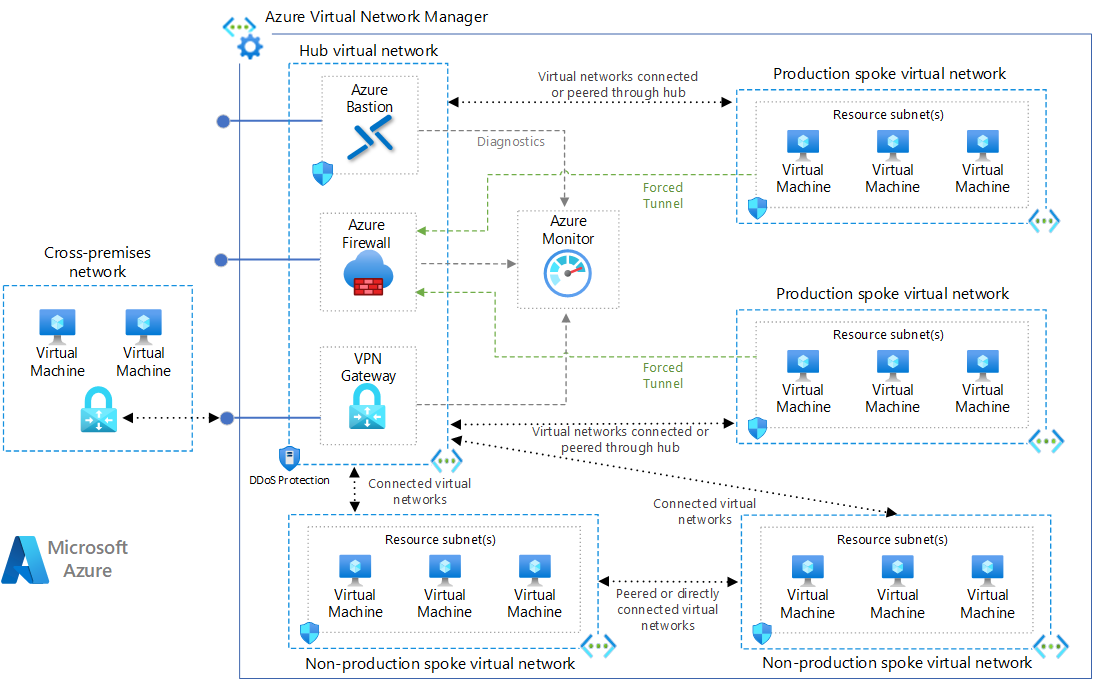



🌐 What is Hub-and-Spoke VNet Model?
🔹 Definition
The Hub-and-Spoke model is a centralized network architecture where:
- A Hub VNet hosts shared networking services
- Multiple Spoke VNets host applications/workloads
- Spokes connect to Hub via VNet Peering
- All traffic is controlled centrally
One-line meaning
One central network controls security and connectivity for many isolated application networks.
❓ Why Hub-and-Spoke Exists (Very Important)
❌ Problem with flat networks
- Every app has its own firewall
- Security rules duplicated
- Hard to monitor traffic
- Expensive and messy at scale
✅ Hub-and-Spoke Solution
- One firewall
- One ingress/egress
- One monitoring point
- Clean separation of workloads
🧱 Architecture Overview
                     Internet
                        |
                 [ Azure Firewall ]
                        |
                   Hub VNet
          ┌─────────────┼─────────────┐
          │             │             │
     Spoke-App      Spoke-DB      Spoke-Shared
    (Frontend)     (Database)     (AKS / Tools)
🏢 Hub VNet — What goes here?
Hub contains shared, central services
| Component | Why |
|---|---|
| Azure Firewall | Central security |
| NAT Gateway | Controlled outbound |
| Bastion | Secure admin access |
| VPN / ExpressRoute | On-prem connectivity |
| Private DNS | Name resolution |
👉 No application workloads in Hub
🧩 Spoke VNets — What goes here?
Spokes contain isolated workloads
| Spoke Type | Example |
|---|---|
| App Spoke | Web apps, APIs |
| DB Spoke | SQL, Mongo, Redis |
| AKS Spoke | Kubernetes |
| Tools Spoke | CI/CD agents |
Each spoke:
- Has its own CIDR
- No internet access directly
- Routes traffic via Hub
🔗 Connectivity — VNet Peering
Rules
- Hub ↔ Spoke peering
- ❌ Spoke ↔ Spoke direct peering (usually)
- Non-overlapping CIDRs
CLI Example
az network vnet peering create \
  --resource-group rg-network \
  --vnet-name vnet-hub \
  --name hub-to-spoke-app \
  --remote-vnet vnet-spoke-app \
  --allow-vnet-access \
  --allow-forwarded-traffic
🧭 Traffic Flow (MOST IMPORTANT)
🌍 Outbound Internet Flow
✔ Inspected ✔ Logged ✔ Controlled
🔐 Inbound Traffic Flow
✔ Central security ✔ No public IPs on spokes
🔁 Spoke-to-Spoke Communication
✔ No lateral movement ✔ Firewall-enforced rules
📜 Route Tables (Key to Hub-Spoke)
Spoke Route Table
Why?
- Forces all traffic through Hub
- Prevents internet bypass
- Enables inspection
🖥️ Azure Portal – Build Flow (High Level)
1. Create Hub VNet
2. Deploy Azure Firewall + Bastion
3. Create Spoke VNets
4. Peer Hub ↔ Spokes
5. Create Route Tables in Spokes
6. Add Private Endpoints (optional)
📦 Real-World Example
E-commerce Platform
| VNet | Purpose |
|---|---|
| Hub | Firewall, Bastion, VPN |
| Spoke-Web | Public frontend |
| Spoke-API | Backend services |
| Spoke-DB | Databases |
Result
- No public DB access
- Single firewall
- Easier audits
- Lower cost at scale
⚖️ Hub-and-Spoke vs Flat VNet
| Feature | Flat VNet | Hub-Spoke |
|---|---|---|
| Security | Distributed | Centralized |
| Scaling | Hard | Easy |
| Monitoring | Fragmented | Central |
| Cost | Higher | Optimized |
| Enterprise-ready | ❌ | ✅ |
🎯 Interview One-Liner (Memorize This)
The hub-and-spoke model centralizes security and connectivity using a hub VNet with shared services, while isolating workloads in spoke VNets connected via peering.
🧠 Mental Model (Remember Forever)
Hub = Control Plane
Spokes = Workloads
Peering = Connectivity
Routes = Enforcement
Firewall = Security Brain