🔐 Add HTTPS with Azure Application Gateway (End-to-End)
What you’ll build now
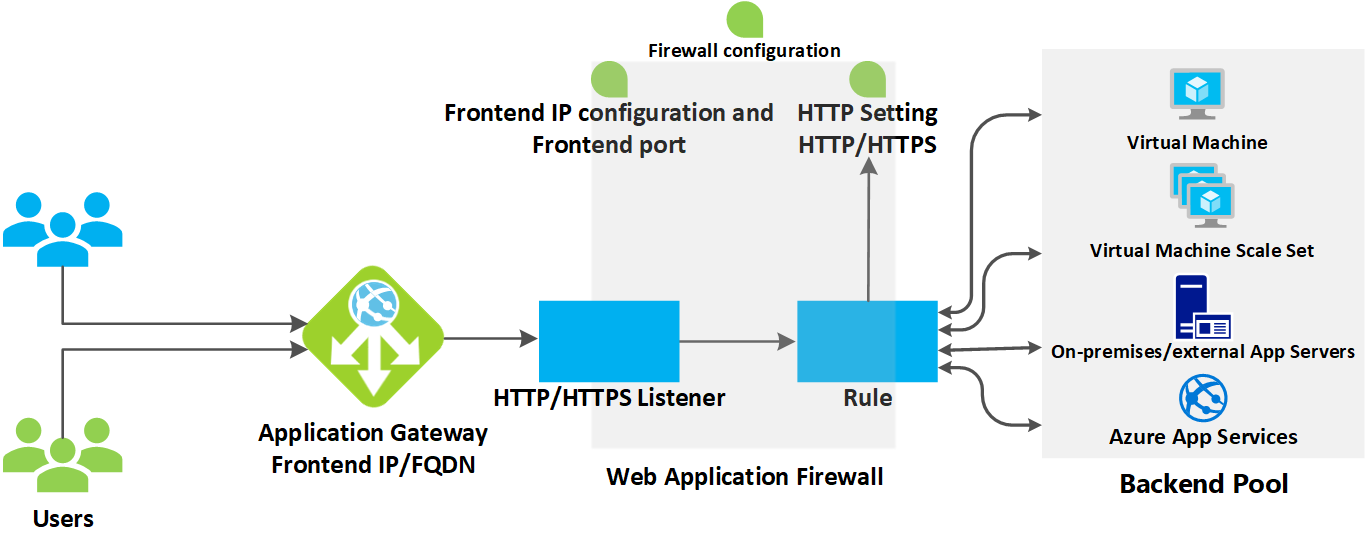

🧠 Key Concepts (Understand First)
| Component | Purpose |
|---|---|
| Application Gateway | Layer-7 (HTTP/HTTPS) load balancer |
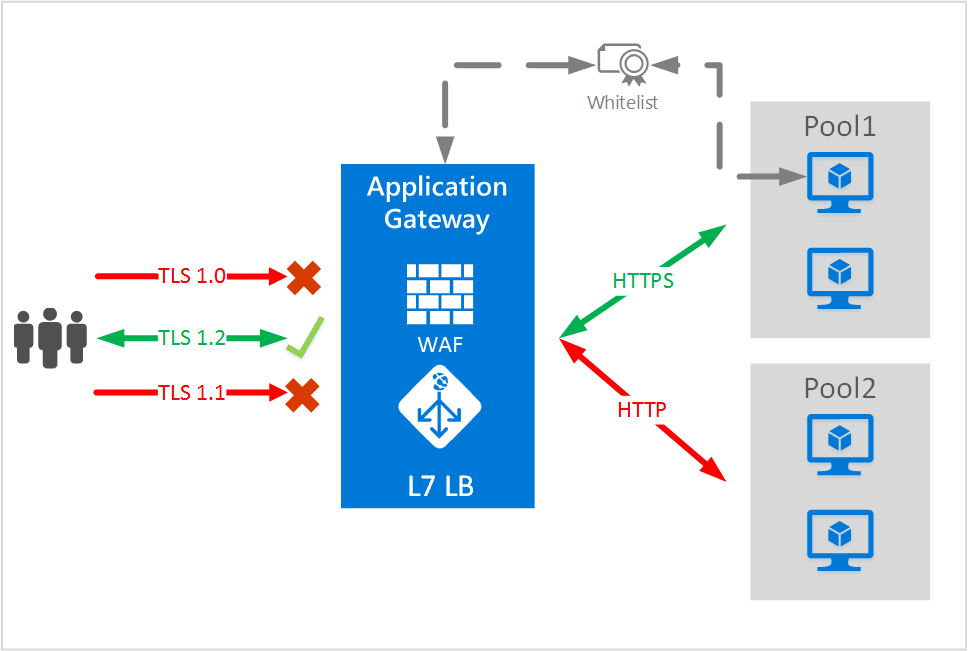
| HTTPS (443) | Secure traffic from users |
| SSL Termination | TLS ends at App Gateway |
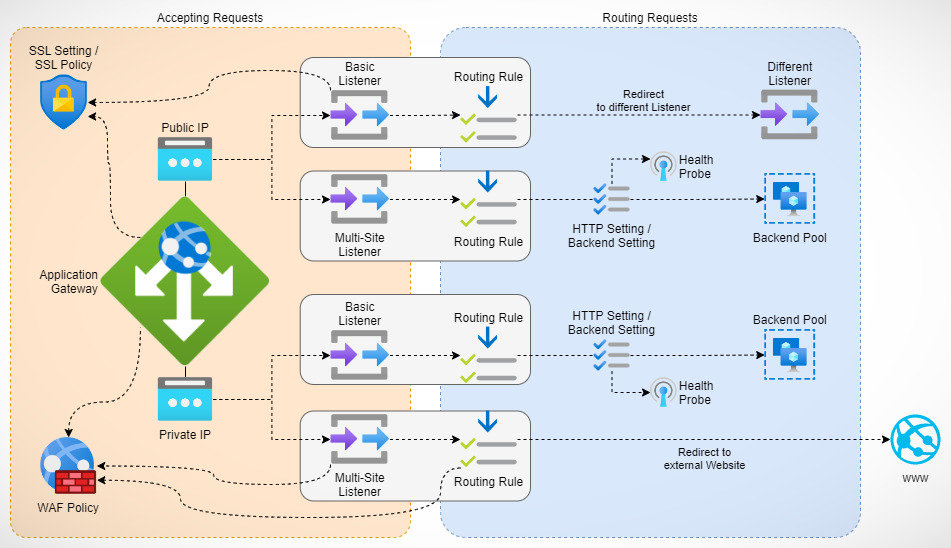
| Backend Pool | Your VM Scale Set |
| Listener | Port + protocol (443/HTTPS) |
| Rule | Listener → Backend mapping |
👉 TLS terminates at App Gateway, backend stays HTTP (simpler & common).
1️⃣ Prerequisites (Checklist)
You already have:
- ✅ VM Scale Set running Nginx
- ✅ HTTP working via Load Balancer
You now need:
- 🔑 SSL certificate (
.pfx) - 🌐 (Optional but recommended) Domain name
2️⃣ Create / Get SSL Certificate
Option A: Self-Signed (Learning / Testing)
Convert to .pfx:
📌 Remember the password you set.
Option B: Production (Recommended)
- Use Let’s Encrypt
- Or buy cert from CA
- Upload
.pfx(same process)
3️⃣ Create Application Gateway Subnet
⚠️ Application Gateway must have its own subnet.
az network vnet create \
  --resource-group rg-azure-vm \
  --name appgw-vnet \
  --address-prefix 10.0.0.0/16 \
  --subnet-name appgw-subnet \
  --subnet-prefix 10.0.1.0/24
4️⃣ Create Public IP for Application Gateway
az network public-ip create \
  --resource-group rg-azure-vm \
  --name appgw-public-ip \
  --sku Standard \
  --allocation-method Static
5️⃣ Create Application Gateway
az network application-gateway create \
  --resource-group rg-azure-vm \
  --name app-gateway \
  --sku Standard_v2 \
  --capacity 2 \
  --vnet-name appgw-vnet \
  --subnet appgw-subnet \
  --public-ip-address appgw-public-ip \
  --http-settings-port 80 \
  --http-settings-protocol Http \
  --frontend-port 80
✔️ App Gateway is now running (HTTP only for now)
6️⃣ Upload SSL Certificate to App Gateway
az network application-gateway ssl-cert create \
  --resource-group rg-azure-vm \
  --gateway-name app-gateway \
  --name appgw-ssl-cert \
  --cert-file appgw.pfx \
  --cert-password "<PFX_PASSWORD>"
7️⃣ Create HTTPS Listener (Port 443)
az network application-gateway frontend-port create \
  --resource-group rg-azure-vm \
  --gateway-name app-gateway \
  --name https-port \
  --port 443
az network application-gateway http-listener create \
  --resource-group rg-azure-vm \
  --gateway-name app-gateway \
  --name https-listener \
  --frontend-port https-port \
  --ssl-cert appgw-ssl-cert
8️⃣ Attach VM Scale Set as Backend Pool
az network application-gateway address-pool create \
  --resource-group rg-azure-vm \
  --gateway-name app-gateway \
  --name vmss-backend-pool
Associate VMSS:
az vmss update \
  --resource-group rg-azure-vm \
  --name web-vmss \
  --set virtualMachineProfile.networkProfile.networkInterfaceConfigurations[0].ipConfigurations[0].applicationGatewayBackendAddressPools='[{"id":"/subscriptions/<SUB_ID>/resourceGroups/rg-azure-vm/providers/Microsoft.Network/applicationGateways/app-gateway/backendAddressPools/vmss-backend-pool"}]'
9️⃣ Create HTTPS Routing Rule
az network application-gateway rule create \
  --resource-group rg-azure-vm \
  --gateway-name app-gateway \
  --name https-rule \
  --http-listener https-listener \
  --rule-type Basic \
  --address-pool vmss-backend-pool \
  --http-settings appGatewayBackendHttpSettings
🔁 (Optional but Best Practice) HTTP → HTTPS Redirect
az network application-gateway redirect-config create \
  --resource-group rg-azure-vm \
  --gateway-name app-gateway \
  --name http-to-https \
  --type Permanent \
  --target-listener https-listener
🔍 Test HTTPS
Get public IP:
az network public-ip show \
  --resource-group rg-azure-vm \
  --name appgw-public-ip \
  --query ipAddress -o tsv
Open:
✔️ HTTPS works ✔️ SSL terminated at App Gateway ✔️ Traffic forwarded to VMSS
🔐 Security Flow (Very Important)
Why this is good
- Cert managed in one place
- Backend stays simple
- Scales automatically
- Easy rotation of SSL certs
✅ What You Achieved (Production-Level)
✔ Layer-7 load balancing ✔ HTTPS termination ✔ Secure public endpoint ✔ VMSS backend ✔ Ready for autoscaling + rolling updates